See your whole tour business on one screen
A live command centre that pulls bookings, enquiries, departures and payments into one view, built around how your team already works.
A free 30-minute call. We map your tools, show where information gets stuck and agree what to fix first. No obligation to build.
Built for a tour company in AustraliaPublic demo runs on sample data

Quick answer
Antheon builds custom tour operator CRM dashboards: one live screen that brings bookings, enquiries, departures, travellers, messages and reports together in six tabs. Antheon is a systems and process engineering company that works remotely with clients abroad, and built this dashboard for a tour company in Australia. The owner sees the health of the business in ten seconds. Every project starts with a free, 30-minute Systems Audit call about how your business runs today.
Last updated
Why does knowing your week take five tools?
Most tour operators start the day the same way: open the booking system, then the ads manager, then email, WhatsApp and Instagram, then the departure spreadsheet, then ask the team who still owes money. By the time the picture comes together, half the morning is gone and the numbers are already out of date.
The cost of staying like this is rarely one big failure. It is small things found too late:
- Balances go unpaid because nobody saw them in time.
- Seats stay empty while interested enquiries sit unanswered.
- WhatsApp and Instagram enquiries get lost between inboxes.
- You ask five people for an update, every single week.
What is a tour operator CRM dashboard?
A tour operator CRM dashboard is one live screen that shows bookings, enquiries, departures, travellers and payments together, fed automatically by the tools the business already uses. The Antheon build organises everything into six tabs, so the owner sees how the business is doing in ten seconds and each team sees only what it needs to act on.
| Tab | What it shows | Who uses it |
|---|---|---|
| Overview | Revenue and travellers booked against the previous 30 days, seats filled, a revenue forecast, priority tasks and every booking with its payment status. | Owner, whole team |
| Pipeline | Each enquiry from first message to ready to book, with its source, trip, group size, value and waiting time. | Sales |
| Departures | A calendar of trips, how full each one is, who is travelling and what must happen before it leaves. | Operations |
| Travellers | Every customer with trips taken, lifetime value, next departure and repeat or VIP tags. | Sales, customer care |
| Inbox | Email, WhatsApp, web chat, Instagram and phone messages in one list, each with a suggested reply. | Anyone who talks to travellers |
| Insights | Revenue by month against last year, booking sources, campaign results and traveller reviews. | Owner, marketing |
What is a CRM dashboard?
A CRM dashboard is the screen on top of a customer relationship system that turns its records into live numbers, lists and alerts. Instead of searching records, the team reads one page.
What is a command centre?
A command centre is a single view of every part of the operation at once. In this build it is the Overview tab, which leads to the detail behind each number.
What is a pipeline?
A pipeline is the list of enquiries that have not booked yet, grouped by stage: new, quote sent, following up and ready to book.
What is a departure checklist?
A departure checklist lists what must be done before a trip leaves, such as final payments, passports, room lists and pre-departure packs, and ticks itself off as each one arrives.
The free audit shows which of your tools can feed each tab.
What does it look like in practice?
The 59-second walkthrough below is recorded on the public Travelz demo, a working copy of the dashboard filled with sample data for a fictional tour company. It shows every tab in use, from the Overview to the AI assistant. The real client build looks the same but runs on live data, which stays private.
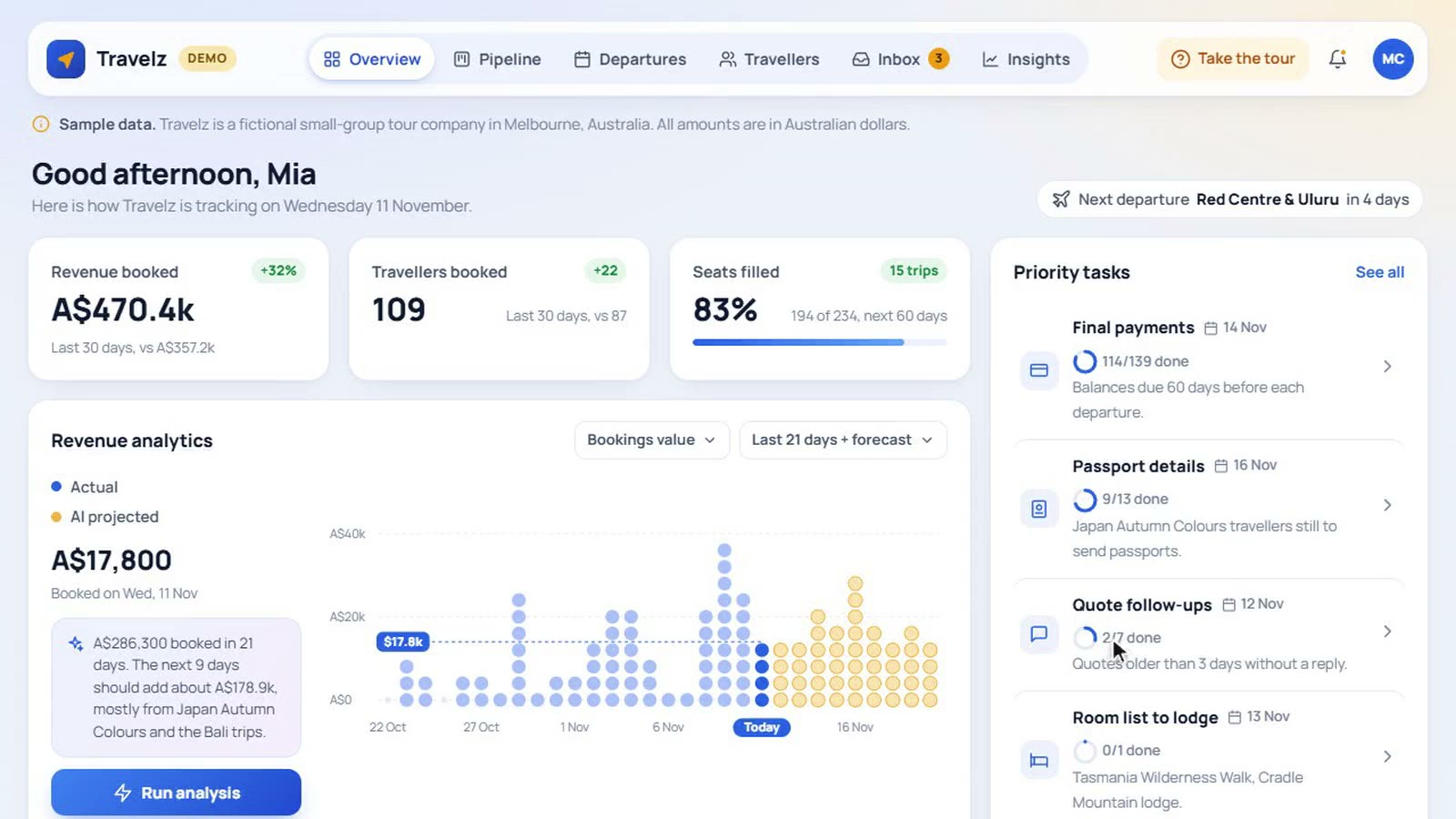
Sample data only. No real traveller or client information appears in the demo.
What the walkthrough shows
- The Overview: revenue and travellers booked, seats filled, and a revenue chart where one day is tapped to show its total.
- Run analysis: the AI assistant names the emptiest upcoming departure and suggests three ways to fill it.
- The bookings table filtered to trips departing soon, with one booking opened.
- The Pipeline with an enquiry opened, showing the suggested next step.
- Departures: one trip selected, showing seats filled, revenue, its checklist and the traveller list.
- Travellers filtered to VIPs, then the Inbox with a suggested reply dropped into the reply box.
- Insights: revenue against last year, booking sources, campaigns and reviews.
Can AI answer questions about my bookings?
Yes. The dashboard includes an AI assistant, powered by Claude, that reads the same live data as the team and answers in plain language. It reads and drafts. It never changes a booking, sends a message or takes a payment on its own: every action stays with a person.
- Answers business questions: “How did this week go?” or “Who still owes money?”
- Drafts follow-ups: for quotes that went quiet, ready to edit.
- Suggests replies: for every message in the Inbox.
- Finds the gaps: spots the emptiest departures and projects revenue ahead.
What does it cost to run an AI assistant on my data?
Running costs for the Antheon AI assistant stay at a few cents a question. Daily question limits cap the total, and smart model routing sends simple questions to a faster, cheaper model, saving the stronger model for harder ones.
In the audit we check which questions your team asks most, so the assistant answers those first.
The system remembers so your team does not have to
The Antheon dashboard watches the business and acts on five alerts and four automations, so nobody has to remember to check. Alerts arrive by phone, email or Slack, worded so anyone understands them in one read.
| What happens | When |
|---|---|
| Morning summary | Daily at 8 AM: new bookings and enquiries, this week’s departures, payments due. |
| New booking alert | The moment a traveller books, with trip, group size and amount. |
| Seats running low | When a departure is down to its last few seats. |
| Quote gone quiet | After three days without a reply, with a follow-up ready to send. |
| Payment overdue | When a balance passes its due date, showing how soon that traveller leaves. |
| Enquiry capture | Every website form, email, WhatsApp, web chat and Instagram message lands in the Pipeline, tagged to its trip. |
| Payment reminders | Balance reminders go to travellers 60 days before departure. |
| Departure checklists | Tick themselves off as passports, room lists and payments arrive. |
| Repeat travellers | Each booking is matched to the traveller’s history and tagged. |
Real example
Built for a tour company in Australia
Antheon built this dashboard for a small-group tour company in Australia running walking, sailing and food trips across Australia, Asia and the Pacific. The client is not named, and the public demo uses sample data in place of theirs.
Before
A booking system for trips and payments, ads on Google, Facebook and Instagram, enquiries arriving by email, WhatsApp, web chat and Instagram, and a spreadsheet for every departure. Every tool worked on its own. None of them talked to each other.
What was connected
The booking system, payments, ad accounts, the email and chat inboxes, and the departure records now feed one dashboard.
What the owner sees now
One screen with the week’s bookings, enquiries, departures and payments, and alerts when something needs attention.
How does the Systems Audit work?
The Systems Audit is a free, 30-minute call and the first step of every Antheon project. On the call, Antheon maps how your business runs today, finds where information gets stuck and agrees what to fix first. If you want to build, you then get an exact scope and quote before any work begins.
What is a Systems Audit?
A Systems Audit is a free, 30-minute review of your current tools, data and daily routines. It ends with a clear picture of what to fix first and, if you want to build, an exact scope and quote.
Audit
We map your tools, data and daily routines and find where time, data and money leak out.
You getA clear picture of how you run today, what to fix first, and a scope and quote if you want to build.
Free, one 30-minute call
Design
We simplify each process first, then design the system: what connects to what, and where AI belongs.
You getThe dashboard tabs, alerts and automations agreed on paper before building.
Timeline set in your build scope
Build
We connect your tools and build the dashboard, automations and AI assistant as one system.
You getA working dashboard early, shaped tab by tab with your team’s feedback.
Timeline set in your build scope
Optimise
We test against real use, refine the workflows and document everything so your team owns it.
You getDocumentation, a guided tour for new staff, and new tabs or alerts as the business changes.
Ongoing, optional
This is for you if
- You run group trips with set departure dates.
- Bookings, enquiries and payments live in different tools.
- You find unpaid balances or empty seats too late.
- Enquiries arrive on WhatsApp, Instagram and email.
This is not for you if
- One booking platform already gives you every answer.
- You want a website redesign, not a system.
- You want AI that books or replies on its own.
- You need an off-the-shelf tool switched on today.
Not sure you fit? The audit is free and 30 minutes. It is where fit gets checked, honestly.
Questions owners ask before booking an audit
The Systems Audit is free: a 30-minute call with no obligation to build. The dashboard build is quoted after the audit, once the scope is clear, so you see the exact cost before any build begins. A focused dashboard costs less than a full multi-tool system with an AI assistant. Running the AI assistant costs a few cents a question, capped by daily limits.
The build timeline depends on how many tools need connecting and how many tabs you need, so it is set per project rather than promised up front. The audit itself is one 30-minute call. You get a working dashboard early in the build, then it is shaped tab by tab with your team’s feedback, and the exact timeline is written into the build scope.
No. The dashboard is fed by live data from the tools you already use, such as your booking system, payments, ad accounts, and email and chat channels. Your team keeps working in those tools while the dashboard pulls the picture together. The free audit checks which of your tools can be connected and how, before you commit to anything.
You do. Everything Antheon builds lives in your accounts and your infrastructure, and it is documented so your team can run and understand it. Your booking, traveller and payment data stays yours.
The system keeps running and stays yours from day one. It lives in your accounts and comes with documentation, so stopping work with Antheon does not switch anything off. Many clients keep Antheon on as an ongoing partner to add tabs and alerts over time, but that is a choice, not a lock-in.
No. The AI assistant can read the data but cannot change anything. It drafts follow-ups and suggested replies, and a person on your team decides whether to send them. There are no accidental edits and no messages sent without a human.
No. The public Travelz demo runs on sample data for a fictional tour company, so no real traveller or client information is shown. It has the same six tabs, alerts and AI assistant features as the real build. The real client dashboard runs on live data that stays private.
No. Most businesses come to Antheon because their processes have grown messy over time, and the Systems Audit exists for exactly that. The audit maps your current setup, tools and routines as they really are. You do not need clean documentation to begin.
The dashboard on this page was built for a tour company, and tabs like Departures and Travellers are designed around group trips. Antheon builds the same kind of connected system, with a CRM, automations and AI, for other businesses whose work is spread across disconnected tools. The audit is where the fit is checked.
Yes. Antheon works fully remotely, and the dashboard on this page was built for a tour company in Australia. Replies go out between 8 AM and 10 PM Philippine Time (GMT+8), and the 30-minute audit call is set at a time that works in your time zone.
Start with a Systems Audit
Tell us which tools you use today. On a free 30-minute call we map how your business runs, show where information gets stuck and agree what to fix first.
- We reply between 8 AM and 10 PM Philippine Time (GMT+8) with times for your call.
- The audit is free and takes 30 minutes.
- No obligation to build afterwards.